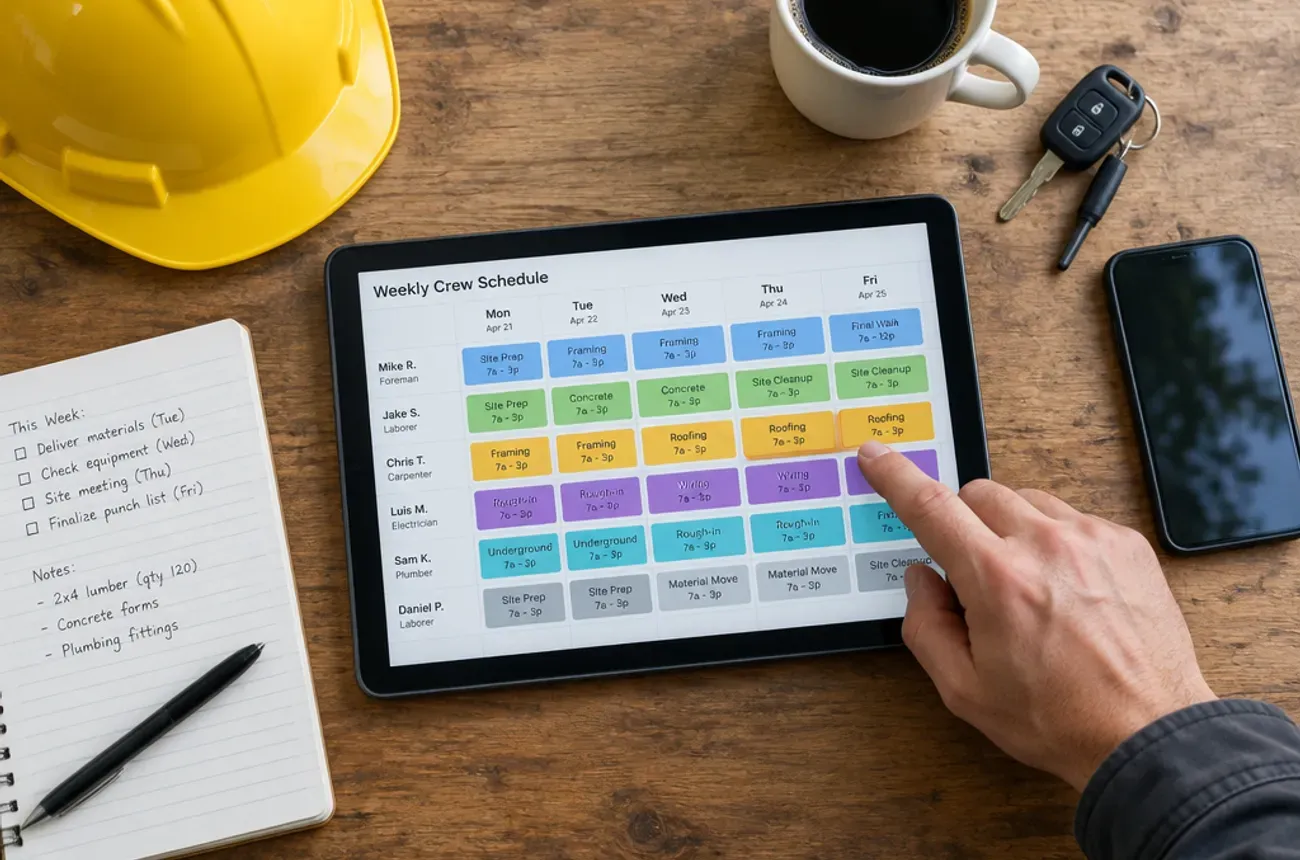
Contractor scheduling software for multi-project crews should show, on one screen, every active job, the phase it is in, which crew and subs are on it each day, and what changed since this morning. If your crew is on three jobs this week and nobody knows who is where, the problem is usually not the people. It is a schedule that lives in your head, a whiteboard, and a group text.
This guide covers why scheduling breaks once crews split across projects, which schedule view fits multi-week work, the features to look for, and a weekly routine that small general contractors and remodelers can start using on Monday.
Why scheduling breaks when crews work several projects at once
One crew on one job is easy to track. Three crews on four jobs, with subs and inspections in between, is a puzzle that changes every day. The schedule breaks when it can only be updated by one person and seen by nobody else.
The symptoms
- The 6 a.m. phone call. Crew leads call or text every morning to ask where they are going.
- Idle hours. A crew shows up and can’t work because materials, a sub, or an inspection isn’t ready.
- Double booking. Two jobs both think they have the tile sub on Thursday.
- Homeowner surprises. A homeowner takes the day off for a start that already moved.
- No record. When a job runs long, nobody can show why or when it slipped.
What it costs
Each idle crew hour is labor you pay for and cannot bill. Each missed start date pushes the rest of the job and the next job behind it. On multi-week projects, small daily slips stack up into finish dates that move by weeks, and into final payments that come late.
Calendar vs. dispatch board vs. Gantt: which view fits crews on multiple projects
Crews on several projects need two views working together: a crew-by-day board for this week and a project timeline for the weeks ahead. Most tools lead with one of the three views below.
| View | Shows best | Strains on | Best for |
|---|---|---|---|
| Calendar | Appointments and who is booked which day | Multi-day jobs, phases, and dependencies | Estimates, walkthroughs, and short jobs |
| Dispatch board | Today’s visits by tech, routes, and arrival windows | Work that spans days or weeks on one site | Service calls and same-day work |
| Gantt / project timeline | Phases, their order, and what waits on what | Seeing which crew is free tomorrow | Planning a remodel from demo to punch list |
The combination that works
- Crew-by-day board for this week and next: one row per crew, one column per day, jobs as blocks that span days.
- Project timeline per job: phases in order, with sub start dates and inspections marked.
- A link between them. When a phase on the timeline slides, the crew board should show the conflict right away.
What to look for in contractor scheduling software
The test for every feature: does it cut the morning phone calls and the idle crew hours? These are the ones that do.
- Multi-day job blocks. A job can sit on the schedule for three days or three weeks without being re-entered each day.
- Crew-level scheduling. Assign a whole crew in one step, not person by person, and filter the calendar by crew.
- Availability and skills. See who is off, who is already booked, and who can do the work (tile, electrical, finish carpentry).
- Conflict warnings. The tool flags a crew or sub booked in two places at once.
- Phases and order. Rough-in before drywall, drywall before paint, with inspections marked.
- Slide the rest of the job. When one phase moves, the phases after it can move with it.
- Subcontractor dates. Subs are on the same schedule as your crew, not in a separate notebook.
- Mobile view for the field. Crew leads see today’s and tomorrow’s jobs, addresses, notes, and photos on their phone.
- Change notifications. When the schedule changes, the people affected get a text or app alert.
- Time tracking from the schedule. Crews clock in to the job they are scheduled on, so hours land on the right project.
- Homeowner updates. Customers get start dates and “on my way” messages without a phone call from you.
A weekly scheduling routine that fixes the chaos
Software helps, but the habit is what stops the 6 a.m. calls. This routine works for small GCs and remodelers with two to five crews:
- Friday: plan next week (30 minutes). Put every crew on a job for each day. Check that materials are ordered and subs are confirmed for anything starting Monday or Tuesday.
- Friday: tell homeowners. Send each active client next week’s plan: who is coming, which days, and what will get done.
- Monday: 10-minute crew lead huddle. Walk the board together. Each lead names one thing that could stop their job this week.
- Every afternoon: crew leads update the job. Progress, photos, and any blockers go into the app before they leave the site.
- 48 hours out: confirm. Call or message subs and suppliers for anything starting in two days. Move work before the crew shows up to an empty site.
- Changes go through one person. One scheduler owns the board. Everyone else asks them, and they make the change in the system.
- No schedule in the group text. The group chat can say “schedule updated.” The schedule itself lives in one place.
The goal is simple: by 5 p.m. each day, every crew lead knows tomorrow’s address, scope, and who else will be on site.
Example week: three crews across five jobs
This is what a working crew board looks like for a small remodeler with three crews, five active jobs, and one tile sub working on two bathrooms that are ready for tile. Each crew lead can read their week in a glance, and the Patel bath appears on two crews’ rows because it changes hands after rough-in.
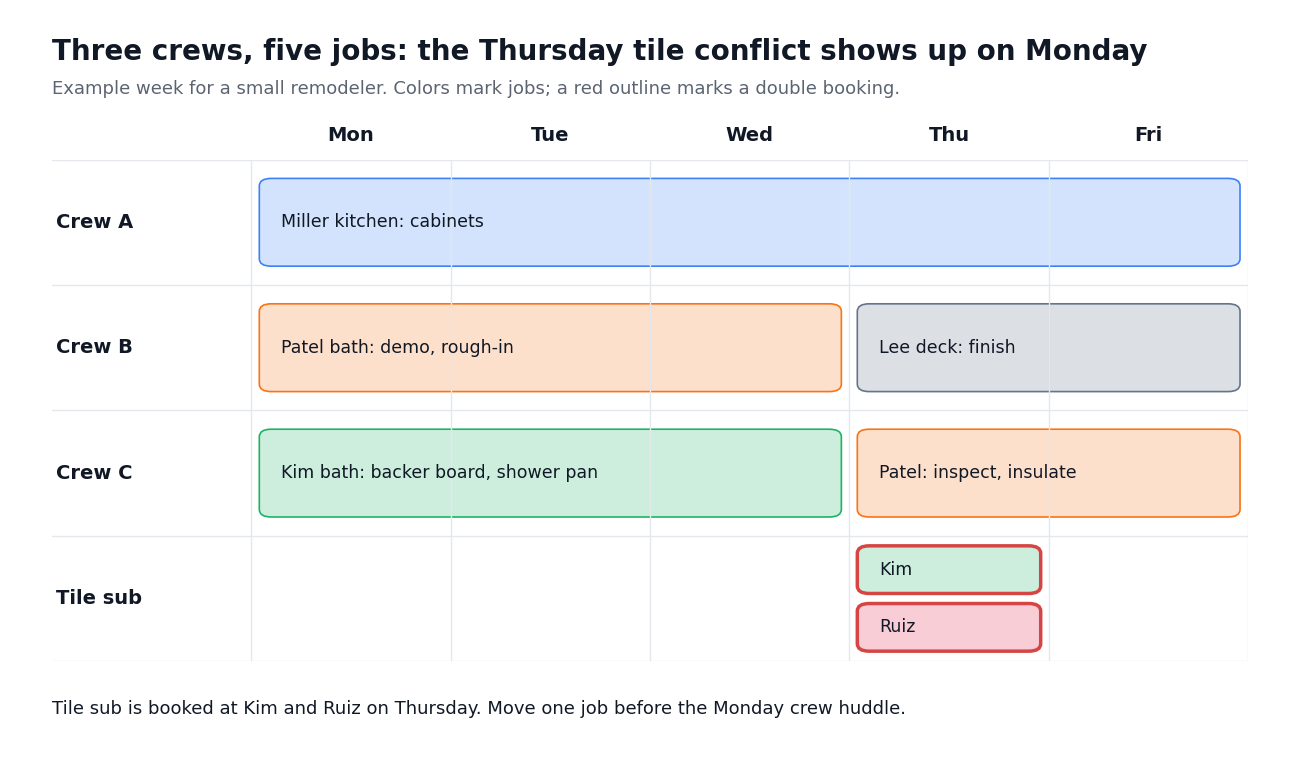
The board catches the problem early: the tile sub is booked at two jobs on Thursday. Found on Monday, it is a two-minute fix. Found Thursday morning, it is an idle sub, a delayed job, and an unhappy homeowner.
Questions to ask in a scheduling software demo
Bring your real week to the demo, not the vendor’s sample data. Ask them to do these live:
- Put a 3-week bathroom remodel on the schedule for Crew B, starting Tuesday.
- Move the drywall phase back two days and show what happens to paint and trim.
- Book the tile sub on two jobs the same day and show me the warning.
- Show me what Crew B’s lead sees on his phone tomorrow morning.
- Show me where the hours Crew B logs this week end up in that job’s costs.
Red flags
- Every job is a one-day appointment. Multi-week work has to be re-entered day by day.
- Crew scheduling costs extra. Check which plan includes crews; some tools save it for their top tier.
- No field view. If crew leads can’t see the schedule on their phone, the morning calls continue.
- Changes don’t notify anyone. A schedule that changes silently is worse than a whiteboard.
How MotionOps handles crew scheduling
MotionOps is built for contractors whose jobs run for days or weeks, with crews split across several projects. The schedule, the job details, and the time records live in one system that the office and the field share.
- Schedule by availability and skills, so you assign the right people and avoid double bookings
- Office and field on the same schedule, from a computer or a phone
- Job notes, photos, and checklists attached to each job, so crew leads know the scope before they arrive
- Time tracking with GPS that feeds payroll and job costs
- “On my way” texts and customer portal links that keep homeowners informed without a call
If your schedule still lives on a whiteboard and in a group text, try MotionOps free for 14 days and plan next week in it.
FAQ
What is crew scheduling software?
Crew scheduling software assigns groups of workers, not single technicians, to jobs over one or more days. It shows which crew is where each day, flags conflicts, and lets crew leads see their schedule on a phone.
Can I use Google Calendar to schedule crews?
For one or two crews on short jobs, yes. It breaks down with multi-day jobs, phases that depend on each other, subs, and time tracking, because a calendar does not know what a job is or who is free.
How far ahead should a contractor schedule crews?
A common approach is a firm schedule for the next two weeks and a tentative one for the next four to eight. Firm means materials are ordered, subs are confirmed, and the homeowner has the dates.
How do I schedule subcontractors across multiple jobs?
Put subs on the same schedule as your crews, confirm them 48 hours before their start, and slide their dates when the phase before them moves.
How much does contractor scheduling software cost?
It depends on the plan and team size, and crew features are often on upper tiers. On Jobber, for example, crew scheduling is part of the Plus plan, which starts at $499/mo for 5 users (Jobber pricing).